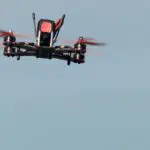
The remote controller for drones, or better known as the radio transmitter, is the most important investment in the FPV hobby aside from the FPV goggles. This is because you can, and will use it for a long time. I’ve listed down all the things that you need to know about the FPV radio transmitter to help you choose the right one for your drone.
- Best Radio Transmitter 2024
- Radiomaster TX16S: The Gold Standard for FPV Drones
- TBS Tango 2: Best Compact Radio for Freestyle Thumbers
- Jumper T20 Gemini: The Most Reliable Radio System for Demanding Pilots
- Radiomaster Boxer: Best Ergonomic Full-Sized Radio with Built-in ELRS
- Jumper T14: The Budget-Friendly Radio with Premium Features
- Radiomaster Zorro ELRS: Best Value Radio with EdgeTX and Long Range
- TBS Mambo: The Low Latency Radio Built for Racing
- BetaFPV LiteRadio 3 Pro: The Most Affordable Radio with Hall Sensor Gimbals and EdgeTX
- Introduction to Radio Transmitter
- Gimbal
- Modes
- Switches on the Radio Transmitter
- Ability to Save Profiles for Different Drones
- Number of Channels
- Operating System
- Radio Frequency
- Radio Link Protocol
- External Module Bay on Radio Transmitter
- Telemetry Support
- Simulator Support
- Battery Support
- Ergonomics
- Aesthetic Considerations
- Final Thoughts
- Additional Information
Best Radio Transmitter 2024
I’ve listed the best radio transmitters in the table below, in case you just want to get the best radio transmitter out there.
Note that I’ve included affiliate links in the tables. If you make any purchases through my links, I will get a small commission for qualified purchases. This helps me to maintain the site without additional cost to you.
Radiomaster TX16S: The Gold Standard for FPV Drones

The TX16S is the gold standard radio in FPV drone. While it is not the most expensive radio in the market, it is often considered the best radio for FPV drones.
TX16S has every quality you need for FPV. For example, hall sensor gimbals, OpenTX (upgradable to EdgeTX), 8 switches which are more than enough, an external module bay, telemetry, voice, colored touch screen, and up to 16 channels.
On top of the basic TX16S, there are Mark 2 (MK II) and Max editions. Those radios are more expensive, and come with additional features. Depending on the editions, they may come with built-in Express LRS, AG01 CNC metal gimbals with even better precision and classier appearance, reverse polarity protection, custom colors, metal face plate, and support high battery capacity.
TBS Tango 2: Best Compact Radio for Freestyle Thumbers

TBS Tango 2 is one of the best radio for thumb style of control. It has a gamepad-like design which may not seem appealing for some. But, it comes with built-in Crossfire that gives you superior range and stability.
One downside of Tango 2 is that it doesn’t come ready with an external module bay. However, you can buy an add-on module bay for 10 bucks and attach it to your Tango 2.
The Pro version of this radio has foldable gimbals, which make storage in the bag easier. It is 40 bucks more expensive though.
Jumper T20 Gemini: The Most Reliable Radio System for Demanding Pilots
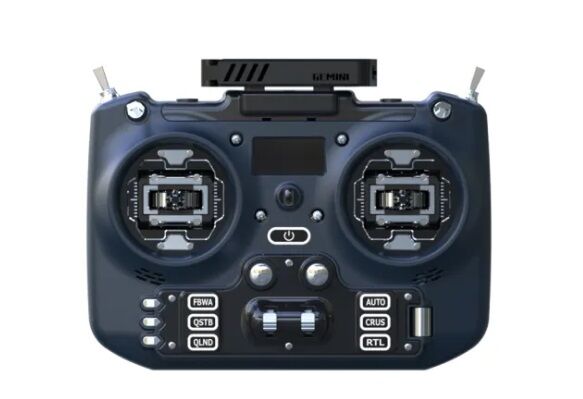
The Jumper T20 Gemini is a high-performance radio transmitter designed for FPV drone pilots who demand the best in reliability and signal quality. Its standout feature is the innovative Gemini Mode, which utilizes two internal transmitters to enhance signal redundancy and minimize the risk of signal loss in challenging environments.
Pros:
- Gemini Mode: Significantly improves signal reliability and reduces latency, especially in noisy or congested areas.
- ExpressLRS Integration: Offers long-range capabilities and low latency for optimal control.
- High-Quality Gimbals: Provides smooth and precise control with either hall effect or RDC90 gimbals.
- Versatile Controls: Features 10 switches, 6 sliders, and 6 flight mode buttons for extensive customization.
- External Module Bay: Allows for additional modules to be added for expanded functionality.
- EdgeTX Firmware: Comes pre-installed with the popular and user-friendly EdgeTX firmware.
- No SD Card Required: Built-in 512MB flash memory eliminates the need for an SD card.
Cons:
- Higher Price Point: The advanced features and Gemini Mode come at a higher cost compared to other radios.
- Increased Power Consumption: Gemini Mode consumes more power, leading to faster battery drain.
- Slow Charging: Charging via USB-C is relatively slow, taking several hours to fully charge the batteries.
- 1W Output Issue: The 1W output setting may not function as intended, with actual output much lower than product spec.
In short, the Jumper T20 Gemini is a top-tier radio transmitter that excels in signal reliability and performance, making it an excellent choice for FPV pilots who fly in challenging environments. While it comes at a higher price and has some minor drawbacks like slower charging and a potential issue with the 1W output, its innovative Gemini Mode and overall feature set make it a compelling option for those seeking the best in radio control technology.
Radiomaster Boxer: Best Ergonomic Full-Sized Radio with Built-in ELRS
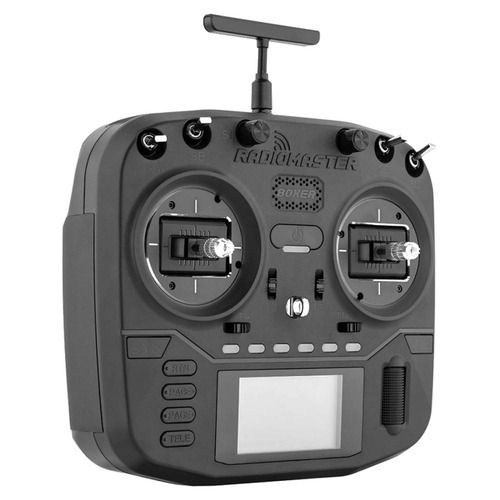
Radiomaster Boxer is priced similar to Radiomaster Zorro, it is a mid-tier radio transmitter suitable for those who do not want a gamepad-style controller.
The size of Radiomaster Boxer is quite similar to TBS Mambo. It is slightly smaller than other full-size radios such as the TX16S, yet providing better experience ergonomically.
This radio comes with a built-in ELRS transmitter, which is the new standard in the FPV hobby. The built-in ELRS transmitter can go up to 1 W output, although 250 mW is probably sufficient for most use cases.
The Radiomaster Boxer runs on EdgeTX. It supports up to 16 channels, and has plenty of switches and buttons for your FPV drones.
If you run this radio on the recommended 6.2 Ah battery, you can fly uninterrupted for 20 hours.
It is also worth-mentioning that Radiomaster Boxer supports Quick Charge 3.0, which significantly shortens the charging time!
Jumper T14: The Budget-Friendly Radio with Premium Features
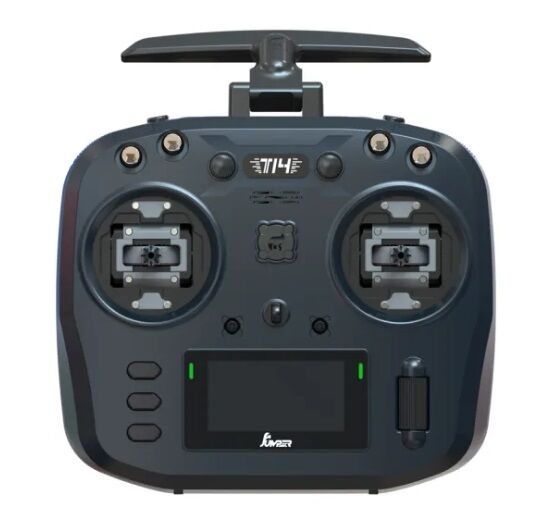
The Jumper T14 is a budget-friendly radio transmitter that offers a great mix of features and performance. It boasts a high-quality 2.42 inch OLED screen with a 128×64 resolution, ensuring a clear and concise display of vital information. The transmitter is available in two versions, one with precise hall-effect gimbals and another with high-end RDC90 gimbals, although the hall-effect gimbals version is more than enough for any pilots.
With ExpressLRS integrated, users have three frequency options to choose from: 2.4GHz, 868MHz, and 915MHz, offering flexibility and long-range capabilities for various applications. The radio’s comfortable ergonomic design ensures a pleasant user experience during extended flights.
Pros:
- High-quality OLED display (2.42 inches, 128×64 resolution)
- ExpressLRS integrated (2.4GHz, 868MHz, 915MHz)
- Precise hall-effect gimbals or high-end RDC90 gimbals
- Foldable antenna for optimal signal and ease of storage
- Comfortable ergonomics
- Affordable price
Cons:
- No flight mode buttons
- Some might prefer the RadioMaster Boxer’s grip
- Lacks the premium feel of higher-end transmitters
Overall, the Jumper T14 is an excellent radio transmitter that offers a lot of value for its price. Its high-quality OLED display, integrated ExpressLRS with multiple frequency options, choice of gimbals, and foldable antenna make it a versatile and powerful option for beginners and experienced pilots alike. While it may lack some of the premium features of more expensive transmitters, its performance and features make it a strong contender in the market.
Radiomaster Zorro ELRS: Best Value Radio with EdgeTX and Long Range
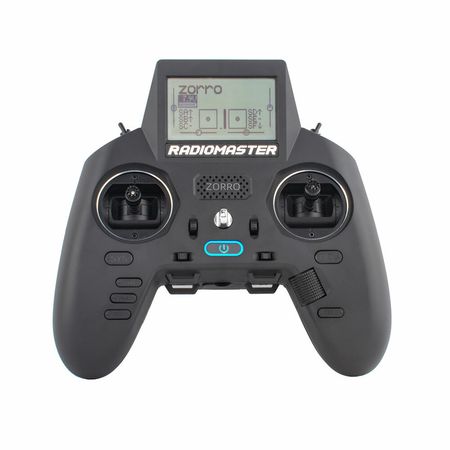
ELRS is the new standard since 2021/2022. It offers low latency for racing, and at the same time long range capability at an affordable price.
Radiomaster Zorro was made available in Jan 2022, and it is probably the first long range-capable radio transmitter using ELRS. It also comes with the latest EdgeTX, which is the new industry standard!
The radio comes with 2 removal batteries. There is a charging port that you can use to charge the battery while flying.
Unlike the Radiomaster TX12, Zorro comes with Hall sensor gimbals. It also has an external module bay in case you want to fly using other protocol.
While it looks like a gamepad, Zorro has plenty of switches than the cheaper radios. The LCD screen is also better in quality.
TBS Mambo: The Low Latency Radio Built for Racing

TBS Mambo is worth considering for those who wants a low latency radio. It comes with a built in TBS Tracer module, and has a JR module bay to fit in other radio that you might want to use. TBS Tracer has a shorter range than the Crossfire, which doesn’t really since your main focus should be racing if you choose this transmitter.
This radio has Hall sensor gimbals which is more durable and give you better control. It has 6 switches. That’s not a lot but 4 of them are 3-positions switches so you should have enough switches to use given there are only 12 channels.
TBS Mambo runs on FreedomTX, which is a variant of OpenTX. The interface and functionality is very similar to that of the OpenTX. The radio is powered by 2 pieces of Li-Ion batteries which can be charged through the USB port on the radio itself.
BetaFPV LiteRadio 3 Pro: The Most Affordable Radio with Hall Sensor Gimbals and EdgeTX

The LiteRadio 3 Pro is the latest radio transmitter from BetaFPV. It’s one of the cheapest that you can get in the market, yet it is packed with most of the key features you would want to have.
The LiteRadio 3 Pro comes with hall sensor gimbals for better precision control. This is rather rare for a radio transmitter priced at 90 bucks at the point of writing.
On top of that, it has a 1.3″ OLED screen. While the screen is small, it is clear and visible even when you are in the field.
There are only 4 switches and 8 channels on the radio. Not a lot, but enough for most beginners.
The transmitter is already preloaded with EdgeTX, the new standard OS for FPV radio transmitters. You can choose between a multiprotocol transmitter, or the new poster boy Express LRS, at the same price.
This tiny radio even comes with an external module bay. That means you can use Ghost or Crossfire as your radio protocol, if you want.
Because the antenna is hidden internally, do expect a shorter ELRS range compared to Radiomaster Zorro. While you can increase the output power to 500 mW to improve the range, the battery will be drained faster, and the radio will likely overheat.
The LiteRadio 3 Pro comes with voice. But the volume is quite low, and it’s not audible outdoors. This makes the radio telemetry rather useless.
Introduction to Radio Transmitter
The radio transmitter, or radio controller, or simply RTX, is basically the remote control that you use to control your drone. It talks to your drone through a radio wave, typically at 2.4 GHz band.
For long-range flight, most pilots will use the 900 MHz band. This is because the 900 MHz radio would travel further than the 2.4 GHz radio wave.
To pick up the radio wave, you need a compatible radio receiver with the same radio frequency and protocol on your drone. The receiver uses an antenna to pick up the radio wave and subsequently pass the information to your flight controller.
Gimbal
The 2 sticks found on your radio transmitter are called the gimbals. As a pilot, you control the movement of your drone through the gimbals.
There are two types of gimbals. The Hall sensor gimbal is more accurate and durable. It uses magnets to determine the movement of the stick.
In contrast, the potentiometer gimbal uses a brushed joint to determine the movement of the stick. Inevitably, there will be friction which causes wear and tear damage to the gimbal. It is cheaper than its counterparts.
There are 4 basic commands that you can give your drone via the gimbals:
- Throttle is where you control how fast you want the motors to spin, thereby affecting speed.
- Pitch is where the drone rotates along the lateral axis. This will move your drone forward or backward.
- Yaw is where the drone rotates along the vertical axis. This will make your drone turn left or right.
- Roll is where your drone rotates along the longitudinal axis. This will move your drone left/right

Modes
The 4 commands from your gimbals can be on the left or right sticks, depending on the manufacturer. This configuration is known as “modes”. There are 4 possible modes available as depicted in the pictures below.


It seems like most of the pilots use mode 2. If you are new in this hobby and you are not sure, you can just follow the trend. However, this is really a personal preference. You just need to pick 1 mode and get used to it. Some radio transmitters allow you to switch modes so that you can try out which is your preferred mode.
Switches on the Radio Transmitter
There are switches on the radio transmitter that you can use for different things such as arming the drone, changing flight modes, return home, and etc.
For FPV racing, we don’t really need a lot of switches. You need at least 1 switch for arming/disarming and 1 for beeping in case you lose it. Having 4-6 or more switches can be helpful in case there are new functions that you want to add on in the future.
Ability to Save Profiles for Different Drones
You can use the same radio transmitter for different drones. For instance, you might have a drone for racing, 1 for photography, 1 for long range etc. Instead of having 3 different transmitters, it is much more convenient to have 1 that controls all the 3 drones.
If your radio transmitter doesn’t have the capability to save the profile of the drones that it pairs to, you will have to pair and set up the drone every time you switch drones. That is really troublesome. Fortunately, most hobby-grade radio transmitters would have such capability.
Number of Channels
Each of the commands that you give your drone would be transmitted through different channels. Since gimbals are already giving 4 commands, 4 of the channels will be occupied.
Then, you will need 1 extra channel (also called the auxiliary channel) for every switch that you plan to use.
The number of channels a radio transmitter can support is affected by the protocol in use. Certain protocols may support up to 16 channels while others might support only 8 channels. We will cover more on the protocol later.
Operating System
When shopping for your radio transmitter, you will likely see the word OpenTX in the specification. It is basically the firmware of your radio transmitter.
OpenTX is extremely powerful and allows the users to configure a lot of things. That includes adjusting the PID and filtering rate of your flight controller, track lap time and etc. You can even play snake on your radio transmitter!
Similar to Betaflight in flight controllers, OpenTX is open sourced and has a huge user base. Most of the radio transmitters in the market would support OpenTX. That also means you can transfer your setting from 1 radio to another radio transmitter when you have the budget to upgrade.
There are also forks from OpenTX such as the EdgeTX and FreedomTX etc. Due to the slowed deployment in OpenTX, EdgeTX has slowly taken over OpenTX. You can flash your radio transmitter to EdgeTX following Joshua Bardwell’s guide.
Radio Frequency
While most radio used in FPV drones operate at 2.4 GHz, there are radios that run below that. Here’s a table of comparison showing the differences between 2.4 GHz and 900 MHz.
| Features | 2.4 GHz | 900 MHz |
|---|---|---|
| Legality | Legal | License required |
| Range | Short | Long |
| Antenna | Small | Big |
| Latency | Low | High |
| Interference | Low | High |
Radio Link Protocol
Different radio transmitters use different languages or radio link protocols to communicate with the radio receivers. Make sure the radio link protocol is compatible with the radio receiver of your drone or they will not communicate.
Popular protocols available in the markets are FrSky ACCESS and ACCST, TBS Crossfire, ImmersionRC Ghost, Spektrum’s DSMX, and the open-sourced Express LRS which is has now become the industry standard. Most protocols are brand-specific.
Certain radio transmitters may support multiprotocol which makes it more versatile if you own multiple drones or other RC toys. Examples are CC2500 and JP4IN1. Do note that multiprotocol modules support only older protocols. They don’t support ACCESS, Crossfire, Ghost, etc. Here is the full list of supported protocols for those multiprotocol modules.
Some radio transmitters support only a single protocol. However, they often have an external module bay which allows you to add another transmitter.
Which Radio Link Protocol to Use?
Having multiple protocols is confusing for beginners who want to buy their first radio. I’ve listed the pros and cons of some commonly used protocols in the table below.
| Features | ACCST | ACCESS | ELRS | Ghost | Tracer | Crossfire |
|---|---|---|---|---|---|---|
| Frequency | 2.4 GHz | 2.4 GHz | 2.4 GHz | 2.4 GHz | 900 MHz | 900 MHz |
| Long Range |  | |  | | | |
| Racing | | | | | | |
| Setup | Difficult | Difficult | Difficult | Easy | Easy | Easy |
| Robustness | High | High | Improving | Improving | High | High |
Express LRS
ELRS 2.4 GHz has a strong signal that can go from 10-20 miles. Unlike 900 MHz long range, ELRS has a very good latency, which allows you to use it in both long range and racing. There is a 900 MHz version, but the 2.4 GHz one is more than enough for long range!
On top of that, ELRS is cheaper than other branded radio because it is open-sourced. Most probably, ELRS will become the mainstream radio in the future.
Note that ELRS transmitters and receivers from different brands are compatible with each other, as long as they have the same frequency. Eg. 2.4 GHz ELRS receivers are compatible with any 2.4 GHz ELRS transmitters, but not 900 MHz ELRS transmitters.
FrSky ACCESS and ACCST
ACCESS is the latest radio link protocol by FrSky. If you choose to use FrSky, ACCESS is the one to go. It has a better latency compared to ACCST, and some receivers allow you to do wireless firmware updates.
ACCST is the older version of FrSky protocol. There are 2 incompatible versions. ACCST V2 is the one to go if you need to use ACCST protocol.
ACCST has been in the market for many years. Most BNF drones in the market have an ACCST option. They are also cheaper compared to ACCESS.
FrSky has started to lock their radio link protocol to their radio transmitter. That means you must use a FrSky product in order to use ACCESS. There are workarounds for now, but they may not work in the future. The only good news is, you can use an ACCESS transmitter on ACCST V2 receivers.
Many people go for the FrSky radio link protocol because it is much cheaper, and it is available in most BNF drones.
However, the process of flashing the firmware is troublesome, even with the wireless feature in compatible receivers.
If you are building a drone with FrSky radio, avoid using any F4 flight controller. Otherwise, you will have to go through the hassle of setting up signal inversion.
ImmersionRC Ghost
ImmersionRC Ghost is a radio protocol utilizing the Long Range technology. It has a very low latency for FPV racing. You can switch between long range mode if you want to fly long distance, and Pure Race mode if you want to race, making it versatile.
Since it is running at 2.4 GHz, you will experience less interference when flying in a group.
Ghost is also quite new in the market. It is not as robust as Crossfire. You might not get as many community support compared to Crossfire due to the smaller user base.
Buy ImmersionRC Ghost transmitter and receiver at GetFPV | Banggood.
TBS Tracer
TBS Tracer is a low latency radio suitable for racing. It has a shorter range compared to Ghost and ELRS. If you are flying only short range, Tracer is something for you to consider.
Buy Tracer transmitter and receiver at GetFPV.
TBS Crossfire
TBS Crossfire is the most robust and popular long range radio link protocol.
Crossfire has a higher latency than Ghost and ELRS. It is also relatively more susceptible to interference than Ghost and ELRS. But, if you always fly alone and latency is not a major concern, Crossfire is definitely the best option for you.
Buy Crossfire transmitter and receiver at GetFPV.
External Module Bay on Radio Transmitter
Most of the radio transmitters within the moderate to high price range would have an external module bay. It allows you to add an extra module that has a different protocol or radio frequency than your built in radio. This enables you to control different types of drones for different purposes.
For instance, to use ImmersionRC Ghost, you need to attach it onto your transmitter’s external module bay. That turns your radio to long range. Well, of course you will need the corresponding receiver on your drone.
There are 2 sizes of external module bay: JR or “micro” size, and lite or “nano” size. Take note of this if you are buying an external radio module.
Telemetry Support
Telemetry is basically a system that collects different information such as the signal strength (Received Signal Strength Indicator or RSSI), battery voltage, current draw etc., and sends it back to the receiving equipment.
Telemetry is useful as it can warn you when you are getting out of range, or when your battery is almost depleted. This will help you to fly safely without having to worry too much about crashing and losing your drone.
If your radio transmitter (and receiver) supports telemetry, you can get that information to be displayed on your radio transmitter display panel, or read out as a warning by your radio transmitter. Of course, you can also get that information displayed on your FPV feed instead.
The same information can be displayed on your FPV screen if you have the OSD set up. However, you might be too focused on flying and neglect those readings. Hence, it is always good to have telemetry support in your radio.
Simulator Support

If you’ve read my article on beginners’ mistakes, you would know that practicing on a simulator is a must for all beginners. When practicing on a simulator, you must use a radio transmitter so that you don’t pick up bad habits from using a keyboard or gamepad.
Most of the new and decent radio transmitters can support simulators. Make sure you choose one that can be connected to your computer or console so that you can practice flying drones in simulation.
As a general rule of thumb, all radios with OpenTX/EdgeTX work with simulators.
Battery Support
Choose a radio transmitter powered by removable Li-Ion or LiPo battery. That gives you long hours of operations and convenience in charging the batteries.
Obviously you need a battery to power up your radio transmitter. The radio transmitter can be powered by different types of batteries such as the alkaline battery and LiPo battery packs.
A radio transmitter that supports an alkaline battery is typically cheaper than those supporting LiPo battery packs. However, an alkaline battery does not last as long as the LiPo battery pack. Moreover, because it is not chargeable, using an alkaline battery can be more expensive in the long run.
On the other hand, we have the Li-Ion/LiPo battery packs with high capacity. With a full charge, you can use your radio transmitter for a few days. While a Li-Ion/LiPo battery is more expensive than an alkaline battery, in the long run it is cheaper because it is chargeable. Most of the pilots out there use a radio transmitter with Li-Ion/LiPo battery pack because of the advantages mentioned earlier.
The downside of using a LiPo battery is that you would then have to manage an extra LiPo battery and its associated risk. I would prefer Li-Ion than LiPo, if possible.
Another aspect to look at is whether the battery is built in. With built in battery, you need to charge your transmitter when it is out of juice. With removable battery, you can simply change the battery to continue using your transmitter.
Another aspect to look at is whether the battery is built-in. With a built-in battery, you need to charge your transmitter when it is out of juice. With a removable battery, you can simply change the battery to continue using your transmitter.
Ergonomics
When choosing a radio transmitter, you should consider if it has the right size for you, whether it is too heavy, is the length of the gimbal sticks appropriate, what is the material of the device, how easy for you to reach the switches, etc.
The way you hold your gimbals also decides what sort of designs are most suitable for you. If you like pinching your gimbal sticks with 2 fingers, you would prefer longer sticks. You will also need a neck strap to support the radio transmitter since you will not be able to hold them firmly.
On the other hand, if you prefer to move your gimbal using your thumbs only, you will need shorter gimbal sticks. Otherwise, your thumbs may not be able to reach the tip of the gimbals. You will also need a softer gimbal tip for your thumb, and a thinner device so that you can grab it firmly.
While ergonomics is definitely something to consider, given that most of us buy our radio transmitter online, it is quite hard for us to evaluate this factor.
If you are buying from a reputable manufacturer in this field, most likely the manufacturer would have considered the ergonomics when designing the radio transmitter. So, it is not something that you would need to concern too much.
Aesthetic Considerations
Other than functionalities, the look of your radio transmitter definitely plays a part in your decision making. Higher end radio transmitters have carbon plate, aluminum finishing, color variants, rubber padding etc. Those things make your radio looks better, if you are willing to pay for the price difference.
Final Thoughts
Given the radio transmitter will outlast your drone, especially racing drones, you would want to invest more money on a good transmitter. You should consider the features that you might need in the future when choosing a radio transmitter. This is wiser than getting a cheap transmitter that cannot keep up with your growing needs.
Additional Information
How to Choose Radio Receiver?
Make sure the radio receiver is compatible with your transmitter and flight controller. Look for those with light weight, more channels and supports telemetry and diversity.
Compatibility
Frequency
There is nothing much to say on frequency, since you have decided the frequency to use. In case you are not aware of, both radio transmitter and receiver must use the same radio frequency. For example, ELRS 900 MHz receiver doesn’t work with ELRS 2.4 GHz transmitter.
Protocol
As mentioned earlier, both radio transmitter and receiver must use the same protocol. Do note that there are 2 versions of ACCST protocol. The ACCST V1 is not compatible with V2.
You should also check if the protocol used is supported by the flight controller. The communication between the FC and radio receiver is done through another set of protocols. Some of those protocols are brand-specific (eg. CRSF), while others are universal (eg. SBUS). Both components must speak the same language to operate your drone.
This shouldn’t be a major concern because most FCs can speak multiple protocol.
Channel
If your transmitters can support 16 channels but your receiver has 8 channels, you can use only 8 channels! It is okay to have lesser channels on your receiver since the extra channels on your transmitter can be used on other drones for other purposes.
Telemetry
A radio transmitter with telemetry doesn’t work if the receiver doesn’t support telemetry. I strongly recommend you to get a receiver with telemetry.
Diversity
Lastly, certain receivers are attached to 2 antennas to improve the signal. This is called diversity. Receiver with diversity should be your first choice.
Do I need to manage the radio frequency of my radio transmitter when flying in a group?
Fortunately, you do not have to manage the radio frequency of your transmitter when flying in a group, unlike the video transmitter.
Once you have bound your radio receiver with the transmitter, the transmitter will only communicate with the specific receiver. When required, the radio signal will hop across different frequencies within the 2.4 GHz band to ensure both transmitter and receiver remain connected and uninterrupted by radio from other pilots.